Asynchronous
Promises
Creating a New Promise
- A promise represents a value that may be available now, later, or never.
- According to MDN, async/await and Promises give you concurrency, while Web Workers give you true parallelism.
const fetchUser = new Promise((resolve, reject) => {
  const success = true;

  if (success) {
    resolve({ id: 1, name: 'Alice' });
  } else {
    reject(new Error('Failed to fetch user'));
  }
});

fetchUser
  .then(user => console.log(user))
  .catch(error => console.error(error));
Creating a Promise That Resolves After a Delay
Useful for simulating network requests or adding delays.
new Promise(resolve => setTimeout(resolve, 2000)) //resolves after 2 sec.

function delay(ms) {
  return new Promise(resolve => {
    setTimeout(resolve, ms);
  });
}

delay(2000).then(() => {
  console.log('2 seconds passed');
});
Using async/await:
async function run() {
  console.log('Waiting...');

  await delay(2000);

  console.log('Done!');
}
Promise.all()
- Waits for all promises to resolve. Rejects immediately if any promise rejects.
const p1 = Promise.resolve('User');
const p2 = Promise.resolve('Posts');
const p3 = Promise.resolve('Comments');

Promise.all([p1, p2, p3])
  .then(results => {
    console.log(results);
    // ['User', 'Posts', 'Comments']
  })
  .catch(error => {
    console.error(error);
  });
Promise.any()
- Resolves with the first fulfilled promise. Ignores rejected promises unless all promises reject.
const p1 = Promise.reject('Server A failed');
const p2 = Promise.resolve('Server B responded');
const p3 = Promise.resolve('Server C responded');

Promise.any([p1, p2, p3])
  .then(result => {
    console.log(result);
    // 'Server B responded'
  });
Promise.allSettled()
- Waits for all promises to finish, regardless of whether they resolve or reject.
const p1 = Promise.resolve('Success');
const p2 = Promise.reject('Failed');

Promise.allSettled([p1, p2])
  .then(results => {
    console.log(results);
  });

/*
[
  { status: 'fulfilled', value: 'Success' },
  { status: 'rejected', reason: 'Failed' }
]
*/
Promise.race()
- Settles as soon as the first promise settles (either resolves or rejects).
const p1 = new Promise(resolve =>
  setTimeout(() => resolve('Fast response'), 1000)
);

const p2 = new Promise(resolve =>
  setTimeout(() => resolve('Slow response'), 3000)
);

Promise.race([p1, p2])
  .then(result => {
    console.log(result);
    // 'Fast response'
  });
A common use case is implementing a timeout for asynchronous operations:
function timeout(ms) {
  return new Promise((_, reject) => {
    setTimeout(() => reject(new Error('Request timed out')), ms);
  });
}

const fetchData = new Promise(resolve => {
  setTimeout(() => resolve('Data loaded'), 5000);
});

Promise.race([
  fetchData,
  timeout(2000)
])
  .then(result => console.log(result))
  .catch(error => console.error(error.message));

// Request timed out
Awaits
Shorthand for try/catch
async function f4() {
  try {
    const z = await promisedFunction();
  } catch (e) {
    console.error(e); // 30
  }
}
- You can handle rejected promises without a try block by chaining a catch() handler before awaiting the promise.
const response = await promisedFunction().catch((err) => {
  console.error(err);
  return "default response";
});
// response will be "default response" if the promise is rejected
Top Level Await
- ES Modules support await at the top level, outside of any function. This is useful for setup that requires async operations.
- This means that modules with child modules that use await will wait for the child modules to execute before they themselves run, while not blocking other child modules from loading.
- How can we use top level await?
- To load necessary configs bootstrapping before executing a logic
- Example: Module needs to wait for language files to load before it can proceed
// Loading configuration at startup
export const config = await loadConfig()

// Database connection that's needed before anything else
export const db = await connectToDatabase()

// One-time initialization
await initializeAnalytics()
import config from "topLevelAwait.js"

//by this time env configs are loded and ready

function render(){
	const backendUrl = config.backendUrl;
}
Fetch Workflow
Building a URL
- URLSearchParams automatically URL-encodes values, with correct encoding for
&,?, etc.
fetch(`/api/search?q=${userInput}`)

const params = new URLSearchParams({
  q: userInput
})

fetch(`/api/search?${params}`)
const url = new URL('https://api.example.com/search')
url.searchParams.set('q', 'javascript')
url.searchParams.set('page', '1')
url.searchParams.set('limit', '10')

console.log(url.toString())
// "https://api.example.com/search?q=javascript&page=1&limit=10"

// Use with fetch
const response = await fetch(url)
Configure Request
Content-Type:
- Tells the server the format of the request body you're sending.
- Example:
application/json
Accept:
- Tells the server which response formats you can handle.
- Example:
application/json
fetch('/api/users', {
  method: 'GET',
  headers: {
    Accept: 'application/json'
  }
})


fetch('/api/users', {
  method: 'POST',
  headers: {
    'Content-Type': 'application/json',
    Accept: 'application/json'
  },
  body: JSON.stringify(userData)
})


// other configuration options
const response = await fetch('https://api.example.com/data', {
  method: 'GET',
  headers: {
	// Authentication token
	'Authorization': 'Bearer eyJhbGciOiJIUzI1NiIs...',

	// Custom header
	'X-Custom-Header': 'custom-value'
  }
})
- For APIs that use cookies, you can use credentials for configurations:
- omit -> never send cookies
- same-origin -> default, send if same origin
- include -> always send cookies
fetch('/api/profile', {
  credentials: 'include'
})
Check Result
- fetch does not throw on HTTP errors like 404 or 500.
try{
	const response = await fetch('/api/users')

	// Check response is 2xx...
	if (!response.ok) {
	  throw new Error(`HTTP Error: ${response.status}`)
	}

	const data = await response.json()
}
catch(error){
	console.error(error, "Network error")
}
- You have options to get response in many different formats once.
await response.json() // JSON
await response.text() // Plain text
await response.blob() // Files/images
await response.arrayBuffer() // Binary data
await response.formData() // Form data
Using Abort Controller
- The AbortController API lets you cancel in-flight fetch requests. This is useful for: Timeouts, User navigation(user left the page), Search inputs(user changed to new search term).
const response = await fetch('/api/data', {
  signal: AbortSignal.timeout(5000)
})

// same as
const controller = new AbortController()

setTimeout(() => {
  controller.abort()
}, 5000)

fetch('/api/data', {
  signal: controller.signal
})
setInterval Vs Nested setTimeout
setInterval
setInterval(() => {
  heavyComputation();
}, 1000);
Characteristics:
- Browser schedules execution every
delaymilliseconds. - If work takes longer than expected, callbacks may pile up.
- Timing can drift under heavy load.
Good for:
- Simple recurring tasks
- Lightweight periodic work
Nested setTimeout
function preciseInterval(callback, delay) {
  function tick() {
    callback();
    setTimeout(tick, delay);
  }

  setTimeout(tick, delay);
}
Characteristics:
- Next timer is scheduled after the current callback finishes.
- No overlapping executions.
- Actual interval is:
callback execution time
+
delay
Good for:
- Polling
- Retry logic
- Long-running work
Event Loop
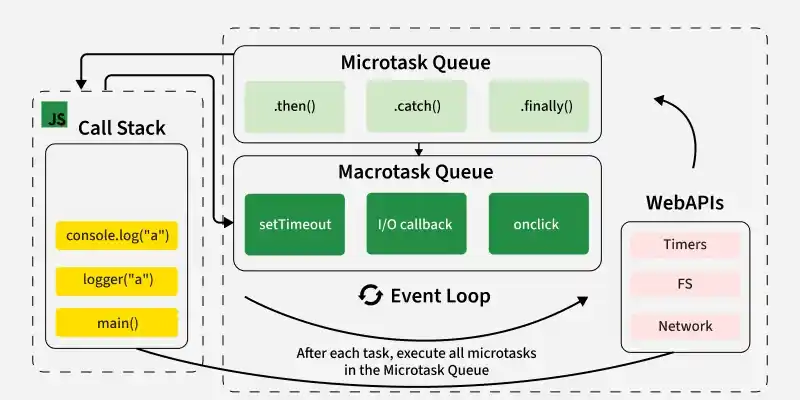
Core Idea
- The Event Loop is responsible for deciding what code runs next.
- The Event Loop is not part of JavaScript itself. It is provided by the runtime environment:
- Browser (Chrome, Firefox, Safari, etc.)
- Node.js
- Other JavaScript runtimes
- JavaScript itself is:
- Single-threaded
- Executes code using a single Call Stack
Execution Flow
Synchronous Code
Synchronous code executes immediately on the Call Stack.
console.log("A");
console.log("B");
Execution order:
A
B
Asynchronous Operations
Some operations are delegated to the runtime environment:
Examples:
setTimeoutsetIntervalfetch- DOM events
- File system I/O (Node.js)
When these operations complete, their callbacks are placed into a queue for later execution.
Event Loop Process
The Event Loop repeatedly:
- Checks whether the Call Stack is empty.
- Executes all available Microtasks.
- Executes one Macrotask (Task).
- Repeats.
Simplified:
Call Stack Empty?
       ↓
Run all Microtasks
       ↓
Run one Macrotask
       ↓
Repeat
Microtask Queue
- Microtasks have higher priority than macrotasks.
- Examples:
- Promise callbacks (
.then,.catch,.finally) queueMicrotask()MutationObserver(browser)
- Promise callbacks (
Promise.resolve().then(() => {
  console.log("microtask");
});
Rule:
After the current synchronous code finishes, all microtasks are executed before moving to the next macrotask.
Macrotask Queue (Task Queue)
- Examples:
setTimeoutsetInterval- DOM events (
click,keydown, etc.) - I/O callbacks
postMessageMessageChannel
setTimeout(() => {
  console.log("macrotask");
}, 0);
Rule:
The Event Loop executes one macrotask, then checks microtasks again.
Example
console.log("start");

setTimeout(() => {
  console.log("timeout");
}, 0);

Promise.resolve().then(() => {
  console.log("promise");
});

console.log("end");
Output:
start
end
promise
timeout
Why?
- Synchronous code runs first.
- Promise callback enters the Microtask Queue.
- Timeout callback enters the Macrotask Queue.
- Microtasks run before macrotasks.
Where Does fetch() Go?
A common misconception is that fetch goes directly into the microtask queue.
What actually happens:
fetch("/api/data")
  .then(response => response.json())
  .then(data => console.log(data));
fetch()starts a network request using browser/Node APIs.- JavaScript continues executing.
- When the request completes, the associated Promise is resolved.
- Promise callbacks (
.then) are placed in the Microtask Queue.
So:
fetch request
     ↓
Browser/Node handles networking
     ↓
Promise resolves
     ↓
.then callback enters Microtask Queue
Browser APIs / Web APIs
Examples:
fetchsetTimeoutsetInterval- DOM events
requestAnimationFramerequestIdleCallback
These are provided by the browser, not by JavaScript itself.
JavaScript
    ↓
Browser API
    ↓
Queue callback
    ↓
Event Loop executes callback